
Domain Registration Information
The information on this page is for domain registrants for whose domains Aspen Digital Services manages registration.
Aspen Digital Services registers domains under TuCows license
Verifying your domain
When a domain is registered, transferred or changed, verification of the changes is required. Verification is accomplished via email to the registrant (domain owner), who reviews and approves the registration/changes. If verification is not completed by the domain owner within 15 days, the domain will be suspended by the registrar.
Domain owners should whitelist domains@aspendigital.net in order to ensure that they receive the domain-verification email.
The subject of the domain verification email will be: "VERIFICATION REQUIRED - Please verify your domain name(s) as soon as possible."
The contents of the email will have a link to review and verify the domain registration:
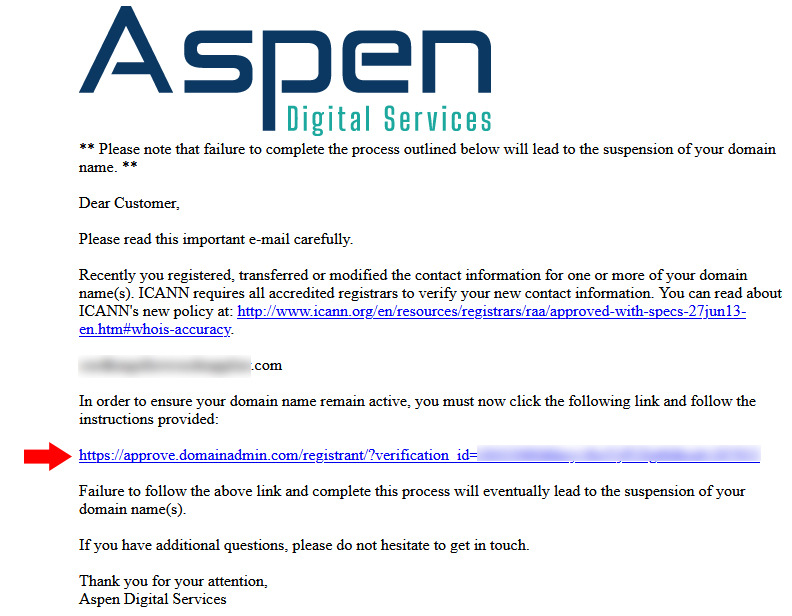
Follow the instructions on the email and verification page to complete verification.
How can I access my domain registration?
To access your domain's registration record, log in at https://manage.opensrs.net/
You will need the following to login:
- your domain name
- username
- password
If you misplace or do not know your username or password, call or email Aspen Digital Services and we will send you a link to set a new password for your account. Your account username will be listed on the password recovery page.
What if Aspen Digital Services does not respond to my domain-related requests?
In the event that Aspen Digital Services becomes unresponsive to domain registration customers' needs or requests, customers may contact OpenSRS.
See heading "I've tried contacting my reseller, but I cannot reach them OR they are unsupportive. What do I do now?" on this page: https://support.opensrs.com/support/solutions/articles/201000063198-communications-at-opensrs
Domain locking
Domains may be "locked" by the registrar to prevent unauthorized transfer of the domain. NOTE: Domain owners cannot lock or unlock a domain using the domain-management interface; domains may only be locked or unlocked by the registrar.
To ensure that domain owners have control over their domains, Aspen Digital Services does not lock domains by default. Domain owners who wish to have their domains locked may contact Aspen with such requests.
Transfering a domain to a different registrar
Transferring a domain from Aspen Digital Services to a new registrar requires the following:
- the domain's "auth" code (authorization code)
- the domain must be in the "unlocked" state
- the domain cannot be under any kind of automatic lock, such as the 60-day lock that follows a domain transfer
To transfer your domain to a new registrar:
- ensure that the domain is unlocked
- log in to your domain control portal at https://manage.opensrs.net/
- copy the "auth code" listed on the interface (you may also contact Aspen and request the auth code)
- register the domain with a new registrar
- an email will be sent to you notifying you of the request to transfer
- the email will include a link to a page that will give you the option to review and approve, or decline, the transfer
- to approve the transfer, use the "auth code" as instructed
I don't want or need my domain anymore
If the time comes when you no longer want or need a domain, no action is required on your part.
Aspen Digital Services does not use domain-renewal automation; domains registered with Aspen may only be renewed manually after receipt of the renewal fee (customers whose sites are about to expire will receive an email about renewing the domain).
Aspen may reach out directly to domain owners whose registrations have expired, to ensure that the expiration was intentional. Otherwise, all domains registered by Aspen Digital Services will expire automatically by default.